> For the complete documentation index, see [llms.txt](https://docs.empe.io/llms.txt). Markdown versions of documentation pages are available by appending `.md` to page URLs; this page is available as [Markdown](https://docs.empe.io/getting-started/tutorial/deploying-issuer.md).
# Deploying the Issuer
**What We Are Doing:**
* Using the [One-Click Deployment portal](https://oneclick.empe.io/) to create an Issuer service.
* Saving the values our application needs to talk to that Issuer: its base URL and an admin access token.
**Why:** The Issuer is a trusted authority that creates Verifiable Credentials. Deploying it through the portal provisions a ready-to-use Issuer API (OpenID4VCI). Once it is Active, its `/agent` endpoints are what you use to create a DID and register the Issuer (see [Creating DIDs and Registering Issuer & Verifier](/getting-started/tutorial/creating-dids-and-issuer.md)), so you can move straight to defining schemas and issuing credentials instead of standing up infrastructure yourself.
**Steps:**
1. Log into the One-Click Deployment platform.
2. Create a new Issuer (see [Create Issuer](/develop/intro/create_issuer.md)).
3. **Save an admin access token** for the Issuer. Its API is protected by an admin **Bearer (JWT)** token that you send in the `Authorization` header to manage schemas, create credential offers, and sign credentials. Obtain the token from the deployment's Keycloak using the credentials shown after creation — see [Authenticating to Your Deployment](/develop/intro/authenticating-to-your-deployment.md). Treat it like a password and store it securely; tokens expire, so refresh when needed.
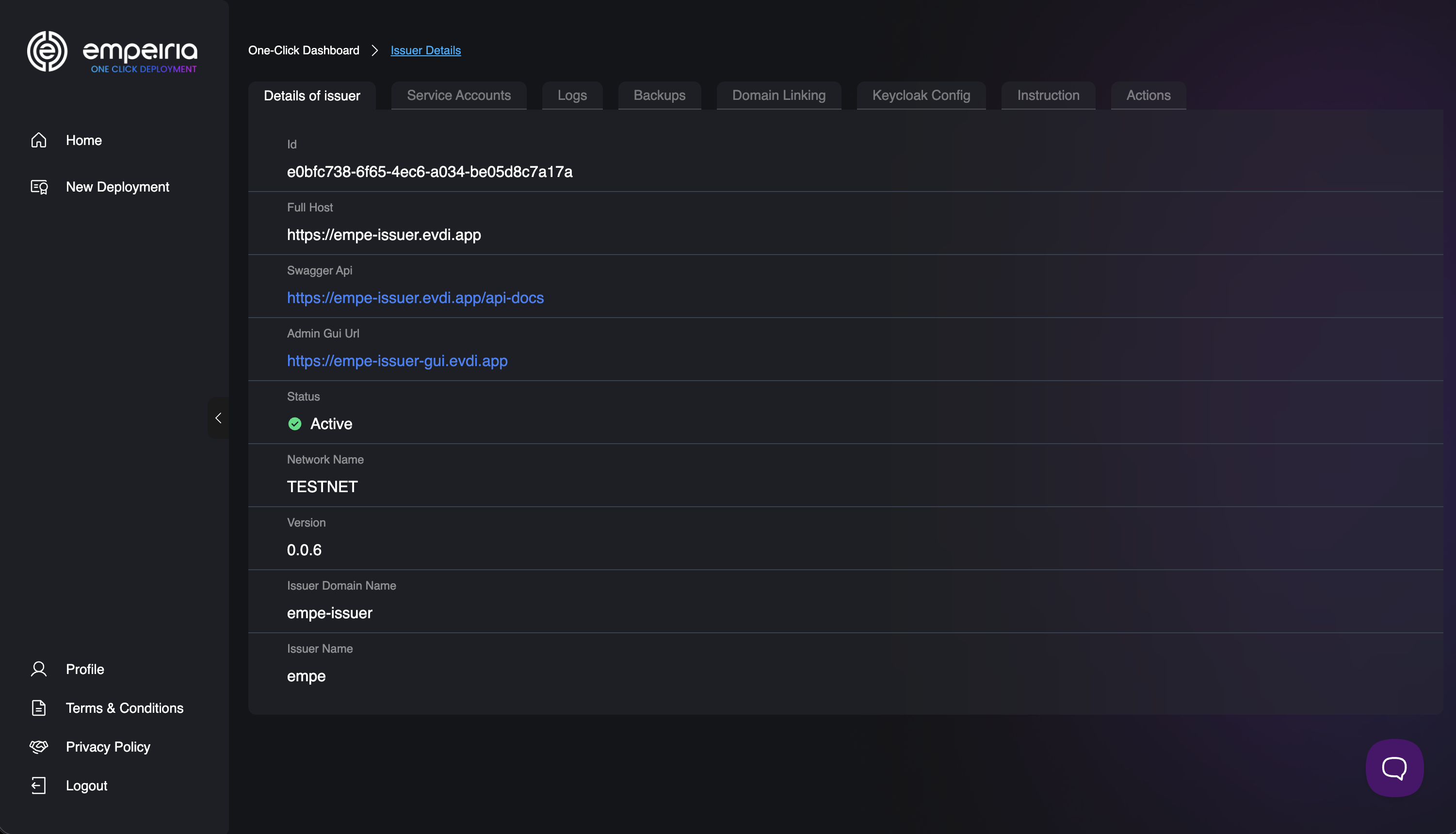
4. Wait until the Issuer status changes to **Active**, then open its **Issuer Details** to note the deployment's base URL (e.g., `https://your-issuer.evdi.app`).
Issuer Details in the One-Click portal, showing the Full Host (base URL)
5. Store these two values in your `.env` file so your application can read them securely:
```
ISSUER_BASE_URL=https://your-issuer.evdi.app
ISSUER_ACCESS_TOKEN=your-oidc-access-token
```
After saving these, they are available in your code as `process.env.ISSUER_BASE_URL` and `process.env.ISSUER_ACCESS_TOKEN`. To use them in your terminal, run `source .env` first.
Every administrative call to the Issuer API carries the access token as a Bearer token:
```bash
curl "$ISSUER_BASE_URL/schemas" \
-H "Authorization: Bearer $ISSUER_ACCESS_TOKEN"
```
On a fresh deployment the response is an empty list (`[]`) — no schemas exist yet. What matters is that the request was accepted: the same header authorizes every administrative call in this tutorial, from uploading schemas to creating credential offers.
Wherever the Issuer API expects an `:issuerDid` path segment (for example, `POST /issuers/:issuerDid/schemas`), use your Issuer's DID — the `did:web` (a web-hosted DID whose document the service serves over HTTPS) or `did:key` you created and bound to the Issuer in [Creating DIDs and Registering Issuer & Verifier](/getting-started/tutorial/creating-dids-and-issuer.md). The portal provisions the deployment; creating the DID and registering the Issuer are one-time API steps you run against this deployment (see [Creating DIDs and Registering Issuer & Verifier](/getting-started/tutorial/creating-dids-and-issuer.md)), and you can list your registered Issuers at any time with `GET /agent/issuers`.
> **Local development:** with `AUTH_DISABLED=true` you can omit the `Authorization` header — see [Authenticating to the API](/getting-started/tutorial/authentication.md).
You can browse and try every Issuer endpoint — schemas, credential offers, issuance sessions, and direct signing — in your deployment's interactive API reference at **`/api-docs`** (for example, `https://your-issuer.evdi.app/api-docs`).
Next, we will upload a credential schema to let the Issuer know what kind of credentials we want to issue.
---
# Agent Instructions
This documentation is published with GitBook. GitBook is the documentation platform designed so that both humans and AI agents can read, navigate, and reason over technical content effectively. Learn more at gitbook.com.
## Querying This Documentation
If you need additional information that is not directly available in this page, you can query the documentation by asking a question.
Perform an HTTP GET request on the following URL with the `ask` and `goal` query parameters:
```
GET https://docs.empe.io/getting-started/tutorial/deploying-issuer.md?ask=&goal=
```
`ask` is the immediate question: it should be specific, self-contained, and written in natural language.
`goal` is what the user is ultimately trying to achieve, the reason they need the answer. Sharing it helps GitBook give you a better, more relevant answer. A goal is most helpful when it describes the outcome the user wants rather than restating the question. For example, with `ask=how do I create an API token`, a goal like `automate deployments from our CI pipeline` lets GitBook tailor the answer to that use case.
The response will contain a direct answer to the question and relevant excerpts and sources from the documentation.
Use this mechanism when the answer is not explicitly present in the current page, you need clarification or additional context, or you want to retrieve related documentation sections.